Part 2 of 2 in the “AI Agent Memory” series. Cross-Session Memory with Spring Boot + LangChain4j. Click here for Part 1 of the series.
What Is Long-Term Memory in an AI Agent?
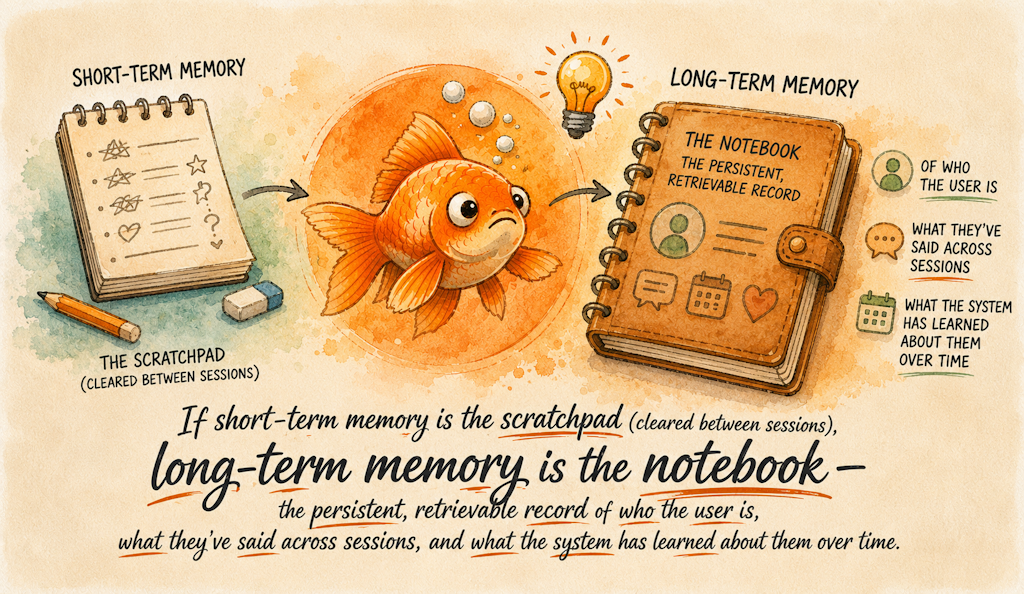
If short-term memory is the scratchpad (cleared between sessions), long-term memory is the notebook – the persistent, retrievable record of who the user is, what they’ve said across sessions, and what the system has learned about them over time. The naive approach is to dump everything into the system prompt: “Here are all 400 interactions this user has had.” That’s expensive, context-window-busting, and filled with noise. The right approach is selective retrieval – finding the most relevant memories for the current moment, not all memories.
This is where vector embeddings and semantic search come in.

The agent gets context that is semantically relevant to the question at hand, not just the chronologically recent.
Short-Term vs. Long-Term: The Full Picture
| Property | Short-Term | Long-Term |
|---|---|---|
| Scope | One session | Cross-session, persistent |
| Storage | In-memory / Redis | Vector store (in-memory for dev, pgvector for prod) |
| Retrieval | All messages in order | Top-K by cosine similarity |
| Cost | Low (no embedding calls) | One embedding call per query |
| Staleness | Never (current session) | Can grow stale; needs lifecycle management |
| Use case | “What did you say 2 turns ago?” | “What did you tell us 2 weeks ago?” |
Use long-term memory when:
- Users return across sessions and expect continuity
- You need to personalize responses based on history or preferences
- Domain knowledge (documents, policies, past decisions) must inform the agent
- Total history is too large to fit in any context window
Combine both when:
- Building a personal assistant, coaching app, or productivity tool
- User retention and relationship continuity are product differentiators
The Architecture: RAG for Memory
Long-term memory in practice is a specific application of Retrieval-Augmented Generation (RAG):
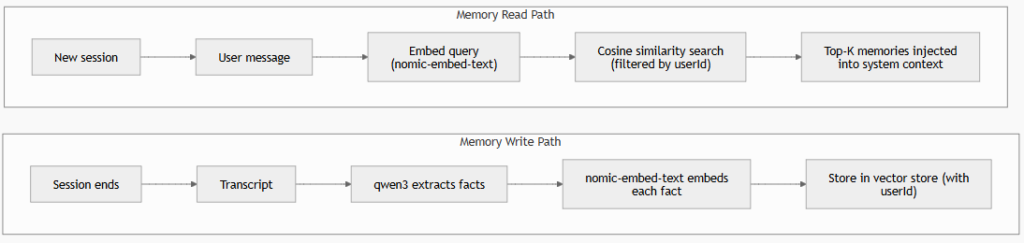
The critical design decision: what do you store?
- Store raw messages – simpler, verbatim, but noisy and large
- Store extracted facts/summaries – smaller, cleaner, but requires an LLM extraction step (qwen3 handles this well)
We implement both patterns in this tutorial.
The Tutorial: Upgrading Our Finance Advisor
We’re extending the Spring Boot application from Part 1. New capabilities:
- At session end, extract key facts from the conversation and store them as long-term memories
- At the start of each new turn, retrieve relevant memories and inject them as context
- The advisor now knows who the user is across sessions
The complete code lives in part2-long-term-memory.
Project Structure
part2-long-term-memory/
├── pom.xml
├── docker-compose.yml         ← Postgres + pgvector for production
└── src/
    ├── main/
    │   ├── java/me/johnra/tutorial/advisor/
    │   │   ├── AdvisorApplication.java
    │   │   ├── config/
    │   │   │   ├── AiConfig.java
    │   │   │   └── MemoryConfig.java
    │   │   ├── model/
    │   │   │   └── UserMemory.java
    │   │   ├── service/
    │   │   │   ├── FinanceAdvisor.java
    │   │   │   ├── MemoryExtractor.java
    │   │   │   ├── LongTermMemoryService.java
    │   │   │   └── AdvisorService.java
    │   │   └── web/
    │   │       └── AdvisorController.java
    │   └── resources/
    │       └── application.yml
    └── test/
        └── java/me/johnra/tutorial/advisor/
            ├── AdvisorIntegrationTest.java
            └── CrossSessionMemoryTest.java
Step 1: Dependencies
The key addition is the LangChain4j core library (for EmbeddingStore, EmbeddingStoreContentRetriever, and related types) alongside a pgvector dependency for production persistence:
<dependencies>
    <dependency>
        <groupId>org.springframework.boot</groupId>
        <artifactId>spring-boot-starter-web</artifactId>
    </dependency>

    <dependency>
        <groupId>dev.langchain4j</groupId>
        <artifactId>langchain4j-spring-boot-starter</artifactId>
        <version>${langchain4j.version}</version>
    </dependency>

    <dependency>
        <groupId>dev.langchain4j</groupId>
        <artifactId>langchain4j-ollama-spring-boot-starter</artifactId>
        <version>${langchain4j.version}</version>
    </dependency>

    <!-- pgvector for production persistence -->
    <dependency>
        <groupId>dev.langchain4j</groupId>
        <artifactId>langchain4j-pgvector</artifactId>
        <version>${langchain4j.version}</version>
    </dependency>

    <dependency>
        <groupId>org.postgresql</groupId>
        <artifactId>postgresql</artifactId>
    </dependency>
</dependencies>
Step 2: Configuration
langchain4j:
  ollama:
    chat-model:
      base-url: http://localhost:11434
      model-name: qwen3
      temperature: 0.7
      timeout: PT120S
    embedding-model:
      base-url: http://localhost:11434
      model-name: nomic-embed-text
      timeout: PT60S

spring:
  datasource:
    url: jdbc:postgresql://localhost:5432/advisor_db
    username: advisor
    password: advisor_secret

advisor:
  memory:
    max-messages: 20
    long-term:
      max-results: 5
      min-score: 0.65
      extraction-enabled: true
The Ollama Spring Boot starter auto-configures both a ChatLanguageModel bean (qwen3) and an EmbeddingModel bean (nomic-embed-text) from these properties – no manual bean creation needed for the models themselves.
Step 3: The Memory Model
// UserMemory.java
public record UserMemory(
    String userId,
    String content,
    String category,    // FINANCIAL_SITUATION | PREFERENCE | GOAL | RISK_PROFILE
    Instant createdAt
) {}
Step 4: Memory Extractor – An LLM That Reads Conversations
We use qwen3 itself to distill a conversation transcript into structured facts. This is an LLM acting as a knowledge extractor. The extracted facts become the raw material stored in the vector database.
// MemoryExtractor.java
public interface MemoryExtractor {

    @SystemMessage("""
        You are a memory extraction specialist. Given a conversation transcript,
        extract factual statements about the user that would be useful for a
        personal finance advisor to remember in future sessions.

        Rules:
        - Extract only facts, not questions or pleasantries
        - Each fact should be a single, self-contained statement
        - Prefix each fact with a category tag:
          [FINANCIAL_SITUATION], [PREFERENCE], [GOAL], or [RISK_PROFILE]
        - Only extract facts about the user's financial life
        - Return an empty list if no meaningful facts are present
        - Maximum 10 facts per conversation

        Example output (one fact per line, no numbering):
        [FINANCIAL_SITUATION] User has $12,000 in credit card debt at 22% APR.
        [GOAL] User wants to eliminate high-interest debt before investing.
        [RISK_PROFILE] User is risk-averse and prefers stable investments.
        """)
    @UserMessage("Extract financial facts from this conversation:\n\n{{transcript}}")
    List<String> extractFacts(String transcript);
}
Step 5: Memory Configuration
MemoryConfig wires together the embedding model, vector store, content retriever, and memory extractor beans:
// MemoryConfig.java
@Configuration
public class MemoryConfig {

    @Value("${advisor.memory.long-term.max-results}")
    private int maxResults;

    @Value("${advisor.memory.long-term.min-score}")
    private double minScore;

    @Bean
    public EmbeddingStore<TextSegment> longTermMemoryStore(DataSource dataSource) {
        return PgVectorEmbeddingStore.builder()
                .datasource(dataSource)
                .table("user_long_term_memory")
                .dimension(768)         // nomic-embed-text output dimension
                .createTable(true)      // DDL on startup (safe to leave on)
                .build();
    }

    @Bean
    public ContentRetriever longTermMemoryRetriever(
            EmbeddingStore<TextSegment> store,
            EmbeddingModel model) {

        return EmbeddingStoreContentRetriever.builder()
                .embeddingStore(store)
                .embeddingModel(model)
                .maxResults(maxResults)
                .minScore(minScore)
                .build();
    }

    @Bean
    public MemoryExtractor memoryExtractor(ChatLanguageModel chatModel) {
        return AiServices.builder(MemoryExtractor.class)
                .chatLanguageModel(chatModel)
                .build();
    }
}
Why 768?
nomic-embed-textproduces 768-dimensional vectors. If you switch embedding models (e.g., tomxbai-embed-largewhich produces 1024 dimensions), update this number and recreate the pgvector table.
Step 6: The Long-Term Memory Service
// LongTermMemoryService.java
@Service
public class LongTermMemoryService {

    private static final Logger log = LoggerFactory.getLogger(LongTermMemoryService.class);

    private final EmbeddingStore<TextSegment> embeddingStore;
    private final EmbeddingModel embeddingModel;
    private final MemoryExtractor memoryExtractor;

    @Value("${advisor.memory.long-term.extraction-enabled}")
    private boolean extractionEnabled;

    public LongTermMemoryService(EmbeddingStore<TextSegment> embeddingStore,
                                  EmbeddingModel embeddingModel,
                                  MemoryExtractor memoryExtractor) {
        this.embeddingStore = embeddingStore;
        this.embeddingModel = embeddingModel;
        this.memoryExtractor = memoryExtractor;
    }

    /**
     * Called when a session ends. Extracts facts from the conversation
     * and stores them as embeddings keyed by userId.
     */
    public void consolidateSession(String userId, List<ChatMessage> messages) {
        if (!extractionEnabled || messages.isEmpty()) return;

        String transcript = buildTranscript(messages);
        List<String> rawFacts = memoryExtractor.extractFacts(transcript);

        // qwen3 may include think tags in extraction output too - strip them
        List<String> facts = rawFacts.stream()
                .map(f -> f.replaceAll("(?s)<think>.*?</think>\\s*", "").trim())
                .filter(f -> !f.isBlank())
                .toList();

        if (facts.isEmpty()) {
            log.debug("No facts extracted for user={}", userId);
            return;
        }

        log.info("Extracted {} facts for user={}", facts.size(), userId);

        for (String fact : facts) {
            Metadata metadata = Metadata.from("userId", userId);
            metadata.put("extractedAt", Instant.now().toString());
            metadata.put("category", parseCategory(fact));

            TextSegment segment = TextSegment.from(fact, metadata);
            Embedding embedding = embeddingModel.embed(segment).content();
            embeddingStore.add(embedding, segment);
        }
    }

    /**
     * Explicitly store a single memory fact (for "remember this" flows).
     */
    public void store(UserMemory memory) {
        Metadata metadata = Metadata.from("userId", memory.userId());
        metadata.put("category", memory.category());
        metadata.put("createdAt", memory.createdAt().toString());

        TextSegment segment = TextSegment.from(memory.content(), metadata);
        Embedding embedding = embeddingModel.embed(segment).content();
        embeddingStore.add(embedding, segment);

        log.info("Stored explicit memory for user={} category={}", memory.userId(), memory.category());
    }

    private String buildTranscript(List<ChatMessage> messages) {
        return messages.stream()
                .map(msg -> {
                    String role = msg.type().name().equals("USER") ? "User" : "Advisor";
                    return role + ": " + msg.text();
                })
                .collect(Collectors.joining("\n"));
    }

    private String parseCategory(String fact) {
        if (fact.startsWith("[FINANCIAL_SITUATION]")) return "FINANCIAL_SITUATION";
        if (fact.startsWith("[PREFERENCE]")) return "PREFERENCE";
        if (fact.startsWith("[GOAL]")) return "GOAL";
        if (fact.startsWith("[RISK_PROFILE]")) return "RISK_PROFILE";
        return "GENERAL";
    }
}
Step 7: Updating the AI Service to Use Long-Term Memory
The ContentRetriever bean is the bridge. LangChain4j’s AiServices calls it before each LLM invocation, embeds the user’s message using nomic-embed-text, searches the vector store, and injects the top-K results into the prompt context automatically.
// FinanceAdvisor.java
public interface FinanceAdvisor {

    @SystemMessage("""
        You are a knowledgeable and empathetic personal finance advisor.

        You have access to relevant memories from previous conversations with this user,
        provided in the context below. Use these naturally - don't announce that you're
        using memory, just incorporate it the way any attentive advisor would.

        Guidelines:
        - Reference past context to show continuity: "As you mentioned before...", "Given your goal of..."
        - Ask clarifying questions when relevant context is missing
        - Never provide specific stock picks or guaranteed returns
        - Be encouraging but realistic
        """)
    String advise(@MemoryId String sessionId, @UserMessage String userMessage);
}
Updated AiConfig with the retriever wired in:
// AiConfig.java
@Bean
public FinanceAdvisor financeAdvisor(ChatLanguageModel model,
                                     ChatMemoryProvider chatMemoryProvider,
                                     ContentRetriever longTermMemoryRetriever) {
    return AiServices.builder(FinanceAdvisor.class)
            .chatLanguageModel(model)
            .chatMemoryProvider(chatMemoryProvider)
            .contentRetriever(longTermMemoryRetriever)   // ← wires RAG
            .build();
}
Step 8: Updating the Advisor Service
Session close now triggers memory consolidation:
// AdvisorService.java
@Service
public class AdvisorService {

    private final FinanceAdvisor advisor;
    private final InMemoryChatMemoryStore shortTermStore;
    private final LongTermMemoryService longTermMemoryService;

    public String startSession() {
        return UUID.randomUUID().toString();
    }

    public String chat(String sessionId, String message) {
        String raw = advisor.advise(sessionId, message);
        return stripThinkTags(raw);
    }

    /**
     * Ends a session: consolidates short-term into long-term memory,
     * then clears the short-term store.
     *
     * @param sessionId  ephemeral session key
     * @param userId     persistent user identifier
     */
    public void endSession(String sessionId, String userId) {
        List<ChatMessage> history = shortTermStore.getMessages(sessionId);
        longTermMemoryService.consolidateSession(userId, history);
        shortTermStore.deleteMessages(sessionId);
    }

    private static String stripThinkTags(String response) {
        return response.replaceAll("(?s)<think>.*?</think>\\s*", "").trim();
    }
}
Step 9: Watching Long-Term Memory Work
# Session 1 - establish facts about user "alice"
SESSION_1=$(curl -s -X POST http://localhost:8080/api/advisor/sessions | jq -r '.sessionId')

curl -s -X POST "http://localhost:8080/api/advisor/sessions/$SESSION_1/messages" \
  -H "Content-Type: application/json" \
  -d '{"message": "I have $40k in savings and I am quite risk-averse."}' \
  | jq -r '.reply'

curl -s -X POST "http://localhost:8080/api/advisor/sessions/$SESSION_1/messages" \
  -H "Content-Type: application/json" \
  -d '{"message": "My main goal is to save for a house down payment in about 5 years."}' \
  | jq -r '.reply'

# Close session - triggers fact extraction + embedding into pgvector
curl -X DELETE "http://localhost:8080/api/advisor/sessions/$SESSION_1" \
  -H "X-User-Id: alice"

echo "--- Session 1 ended. Memory consolidated. Starting Session 2... ---"

# Session 2 - fresh session ID, same userId
SESSION_2=$(curl -s -X POST http://localhost:8080/api/advisor/sessions | jq -r '.sessionId')

# This question triggers semantic search over alice's stored memories
curl -s -X POST "http://localhost:8080/api/advisor/sessions/$SESSION_2/messages" \
  -H "Content-Type: application/json" \
  -d '{"message": "Hi! I was thinking about index funds. What do you think for someone like me?"}' \
  | jq -r '.reply'
The advisor in Session 2 will reference Alice’s risk-averse profile and 5-year house goal – even though Session 2 has zero conversation history. The memories were retrieved via cosine similarity between “index funds” and Alice’s stored profile vectors.
The Full Memory Lifecycle
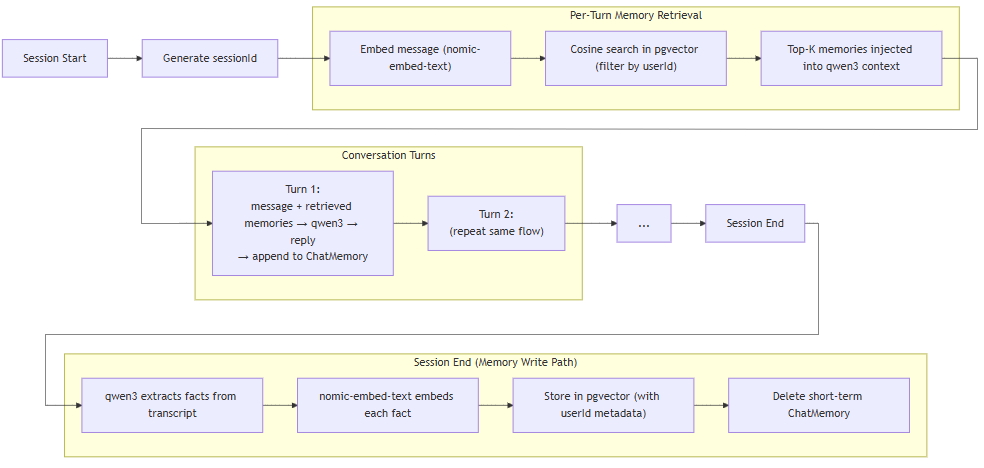
Short-term gives the agent conversational fluency within a session. Long-term gives it continuity and personalization across sessions.
Integration Test: Cross-Session Memory
@SpringBootTest
class CrossSessionMemoryTest {

    @Autowired
    private AdvisorService advisorService;

    @Test
    void longTermMemoryShouldPersistAcrossSessions() throws InterruptedException {
        String userId = "test-user-" + System.currentTimeMillis();

        // Session 1: establish facts
        String session1 = advisorService.startSession();
        advisorService.chat(session1, "I deeply dislike cryptocurrency - bad experience in 2022.");
        advisorService.chat(session1, "My goal is early retirement at 55. I am 34 now.");
        advisorService.endSession(session1, userId);

        // Brief pause for embedding to complete if async
        Thread.sleep(500);

        // Session 2: fresh session, same user
        String session2 = advisorService.startSession();
        String reply = advisorService.chat(session2,
            "What alternative investments should I look at for retirement?");

        // Long-term memory should surface the crypto aversion
        assertThat(reply.toLowerCase()).doesNotContain("crypto");
        assertThat(reply.toLowerCase()).doesNotContain("bitcoin");

        advisorService.endSession(session2, userId);
    }
}
Advanced Patterns
1. Memory Deduplication
Without deduplication, repeated sessions create redundant memories. Before storing, check if a similar fact already exists for the user:
public void storeWithDedup(String userId, String fact, double dedupeThreshold) {
    Embedding newEmbedding = embeddingModel.embed(fact).content();

    EmbeddingSearchResult<TextSegment> existing = embeddingStore.search(
        EmbeddingSearchRequest.builder()
            .queryEmbedding(newEmbedding)
            .filter(metadataKey("userId").isEqualTo(userId))
            .maxResults(1)
            .minScore(dedupeThreshold)
            .build()
    );

    if (existing.matches().isEmpty()) {
        embeddingStore.add(newEmbedding,
            TextSegment.from(fact, Metadata.from("userId", userId)));
    }
}
2. Privacy Isolation
Never retrieve memories across user boundaries. Every vector query must be filtered by userId. This is load-bearing – omitting the filter is a data leak:
EmbeddingStoreContentRetriever.builder()
    .embeddingStore(store)
    .embeddingModel(model)
    .filter(metadataKey("userId").isEqualTo(currentUserId))  // non-negotiable
    .maxResults(5)
    .minScore(0.65)
    .build();
3. Memory Decay
Financial facts from three years ago may be wrong today. Weight retrieval scores by recency:
long ageMs = System.currentTimeMillis() - Long.parseLong(match.embedded().metadata().get("createdAtMs"));
double recencyBoost = Math.exp(-ageMs / (double) Duration.ofDays(180).toMillis());
double adjustedScore = match.score() * recencyBoost;
Production: Docker Compose for pgvector
# docker-compose.yml
services:
  postgres:
    image: pgvector/pgvector:pg16
    environment:
      POSTGRES_DB: advisor_db
      POSTGRES_USER: advisor
      POSTGRES_PASSWORD: advisor_secret
    ports:
      - "5432:5432"
    volumes:
      - pgdata:/var/lib/postgresql/data

volumes:
  pgdata:
docker compose up -dThat’s the only infrastructure you need. Combined with a local Ollama instance, the entire stack – LLM inference, embeddings, and vector persistence – runs on a single laptop with no cloud dependencies.
What We Built Across Both Parts
| Capability | Mechanism | Part |
|---|---|---|
| Multi-turn conversation within a session | MessageWindowChatMemory | Part 1 |
| Isolated memory per user | @MemoryId annotation | Part 1 |
| qwen3 think-tag handling | stripThinkTags() utility | Part 1 |
| Persistent cross-session memory | pgvector embedding store | Part 2 |
| Semantic memory retrieval | ContentRetriever + cosine similarity | Part 2 |
| Automatic fact extraction | qwen3-powered MemoryExtractor | Part 2 |
| Memory deduplication | Similarity threshold on write | Part 2 |
| Fully local stack | Ollama + qwen3 + nomic-embed-text | Both |
Going Further
- Streaming responses: LangChain4j’s
TokenStreaminterface lets you stream tokens back – critical for perceived responsiveness when qwen3 is thinking - Memory summarization: Instead of extracting facts at session end, use qwen3 to write a rolling summary that compresses without losing important context
- Model swapping: Swap qwen3 for a larger local model (llama3.1:70b, mistral-large) or a cloud provider with a one-line change to
application.yml
